Restricting Leave Types
You can restrict leave types such as study leave and unpaid leave to specific departments or employees. For example, you might want to make study leave available only to graduate trainees.
Only employees with access can apply for these leave types and view their balances.
How to restrict a leave type
- Go to Settings -> Leave Types and select the leave type you want to restrict.
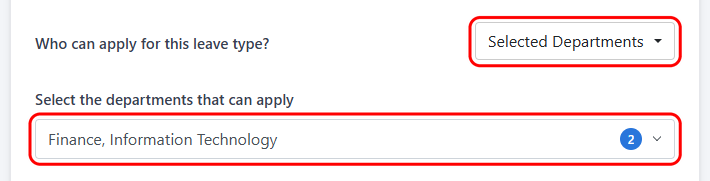
- Under Who can apply for this leave type?, choose Selected Departments or Selected Employees.
- Select the departments or employees who should have access.
Note: Annual, sick, family responsibility, maternity, parental and overtime leave cannot be restricted.
Things to know
- Changing departments: If an employee moves to another department, their access to restricted leave types updates automatically.
This feature is only available in LeavePro Plus.