Leave Balance Notifications
Employees can receive a monthly notification to let them know what their annual leave balance is, or to remind them to take leave.
To enable leave balance notifications select “Settings -> E-mail Notifications” from the menu at the top of the screen.
There are three types of notifications. The first two are under “Emails to all employees” and the third is under “Emails to leave approvers”.
Leave balance

This will send each employee an e-mail at the start of each month to let them know how much annual leave they have available. It’s available on all plans, and with LeavePro Plus it can also be sent by SMS. Employees can unsubscribe from these e-mails.
High balance reminder
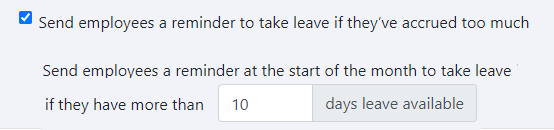
This will send a reminder to employees to take leave if they have more than the number of days you enter. The reminder is sent at the start of each month.
Team leave balances

At the start of each month, leave approvers will receive an e-mail listing each of their employees’ annual leave balances.
Click “Save Settings” when you’re done.
You can also send employees reminders to use carried forward leave before it’s forfeited. See Leave Forfeit Schedule.
This feature is only available in LeavePro Plus.