My Leave Applications
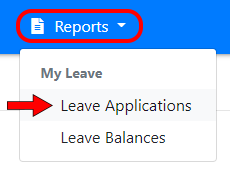
To view all of your leave applications select “My Leave” from the top menu and then click the “Applications” tab:
Your applications are split into two lists:
- Upcoming Leave is leave that hasn’t finished yet, including leave you’re on today. Applications waiting for approval are listed first, followed by the rest with the soonest first.
- Past Leave is leave that has already ended, grouped by year with the most recent first.
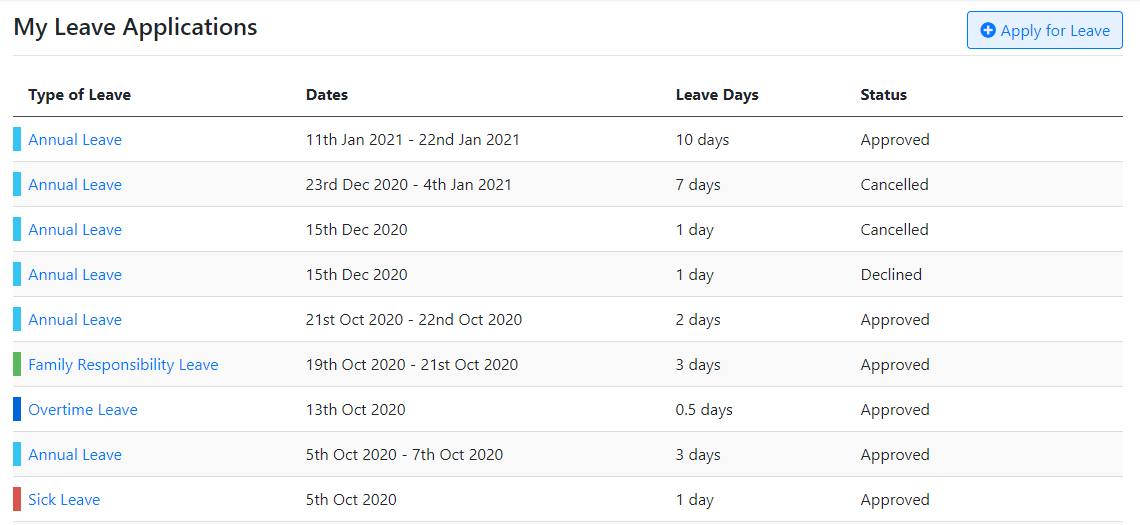
Each application shows its dates, type of leave, number of days and status. Half day leave also shows whether it’s in the morning or the afternoon.
The status shows whether an application is Waiting for approval, Approved, Declined or Cancelled. Cancelled and declined applications are greyed out with their days crossed out, because they don’t count as leave taken.
Viewing an application
Click anywhere on an application to view its full details. From there you can cancel it or ask for it to be changed, see How to cancel a leave application and How to amend a leave application.