Leave Types
By default LeavePro caters for all types of leave required by the Basic Conditions of Employment Act.
These include:
- Annual Leave
- Sick Leave
- Family Responsibility Leave
- Maternity Leave
- Parental Leave
However you can also choose to add other leave types such as:
- Overtime Leave
- Study Leave
- Unpaid Leave
- Other Leave Types
Viewing Leave Types:
Select “Settings -> Leave Types” to view the leave types in the system:
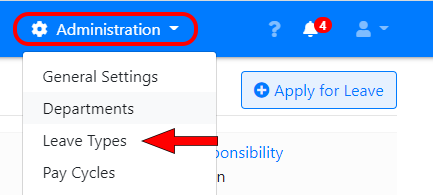
The list shows whether each leave type is active, whether a reason is required when applying for it, and whether you’ve entered a leave policy for it.
Editing Leave Types:
To make changes to a leave type click on its name:
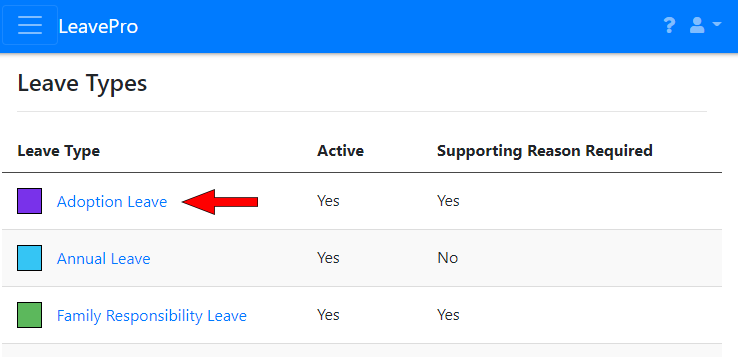
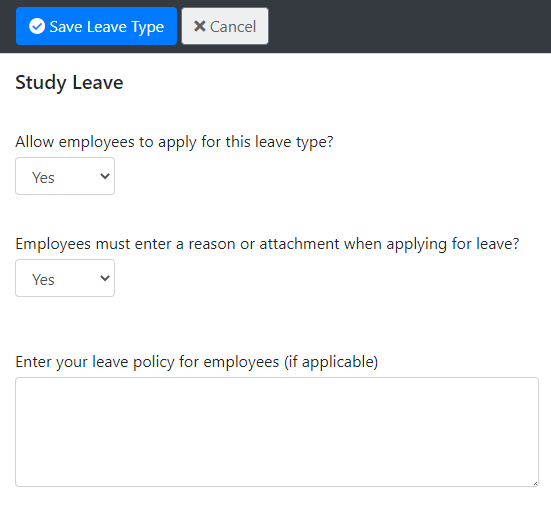
The settings you can change depend on the type of leave. They include:
- Description of leave type: You can rename some leave types, such as study leave and other leave.
- Employees can apply for this leave type: Turn this off if employees shouldn’t be able to apply for this type of leave.
- Reason or attachment required when applying for leave? If this is on, employees can’t submit a leave application for this type of leave without entering a reason or attaching a supporting document.
- Require medical certificate (BCEA rules): For sick leave only. Employees must attach a medical certificate if they’re off sick for more than 2 days in a row, or if they’ve taken sick leave more than twice in an 8-week period. Employees are warned but can still submit the application. Leave approvers can’t approve it until a certificate is attached.
- Who can view their own leave balances? For sick leave and family responsibility leave you can choose whether employees can see their own balances.
- Colour for this leave type on Calendars
- Leave policy (optional): Anything you enter here is shown to employees when they apply for this type of leave. For example, how many days they’re entitled to and any rules that apply.
Leave Rules:
For sick leave and family responsibility leave you can choose whether to use the Basic Conditions of Employment Act (BCEA) rules. If you don’t use the BCEA rules you can enter the number of days employees are entitled to instead. You should never give employees less leave than the BCEA requires.
For other types of leave, such as study leave, you can enter:
- Annual Leave Entitlement (optional): The number of days of this type of leave an employee gets each year. Unused leave doesn’t carry forward to the next leave cycle. If you leave this blank, employees can still apply for this type of leave and the system will keep track of how much they’ve taken.
- Type of days: Choose “Working Days” to take public holidays and the employee’s non-working days into account, or “Calendar Days” to count every day in a row, including non-working days.
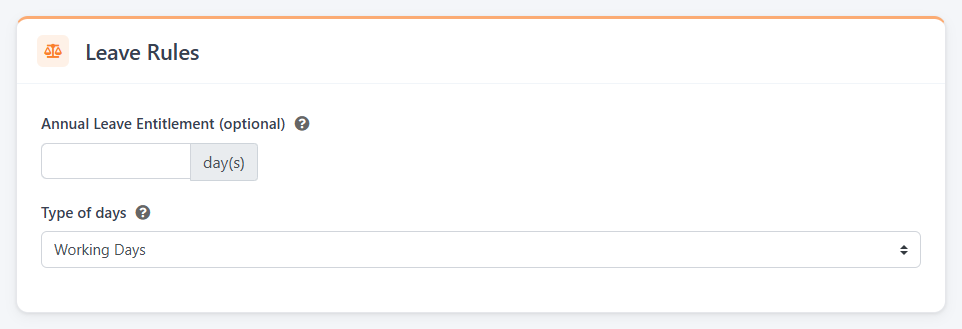
These settings are the defaults for all employees. You can still change sick leave and family responsibility leave for individual employees on their leave policy.
Forfeiting unused annual leave:
With LeavePro Plus you can choose whether unused annual leave that was carried forward is forfeited. See Leave Forfeit Schedule.
Notifications:
You can list up to four additional people who should be notified about this type of leave, as well as the leave approver. You can choose whether they’re notified when leave is approved, cancelled, submitted or declined.