Viewing an employee's leave applications
To view an employee’s leave applications go to the “Employees” screen and click on their name, then select the “Applications” tab.
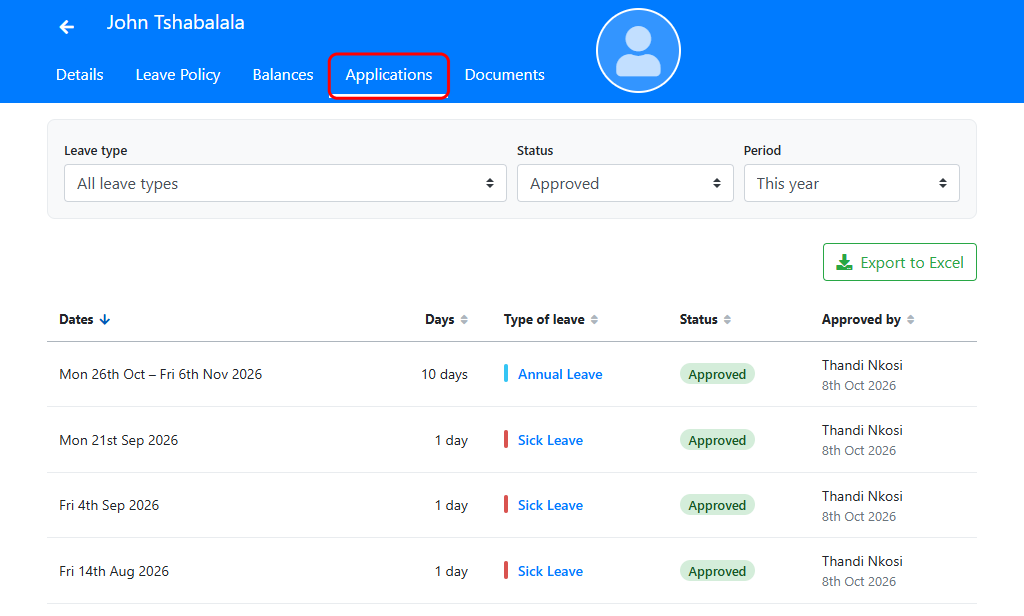
You can filter the applications by:
- Leave type: One type of leave, or all of them.
- Status: Approved, waiting for approval, declined or cancelled, or all statuses.
- Period: This month, last month, this year, last year, all of their applications, or your own dates.
Click a column heading to sort by it, and click on the type of leave to open the application.
Click “Export to Excel” to download the list.
Leave approvers can view the leave applications of the employees they approve leave for from “My Team”. Select the “Team Members” tab and click on the employee’s name, or use the “Leave Applications” tab to see the whole team’s applications (see Viewing your team’s leave).